

Published on May 16, 2025
14 min to read
DM Automation Strategies, Do’s And Don’ts

Summarize with AI

Table of contents
Summarize with AI

ChatGPT

Claude

Perplexity
Share

Vista Social

X (Twitter)


Are you struggling to make your DM automation strategies work without your clients’ messages sounding robotic?
You’re not alone.
Automating your Direct Messages (DMs) can save you a lot of time while boosting your clients’ engagement.
However, if you don’t implement the right strategies, you could spam your audience, miss real opportunities, and even hurt your clients’ brand reputations.
That’s why you need to know what to do and what not to do when deploying DM automation.
In this guide, we’ll explore the dos and don’ts of DM automation to build real connections, nurture leads, and drive sales—even while you sleep.
Ready? Let’s go.
Table of contents
What you will learn
- What are DM automation strategies?
- Why do you need DM automation strategies?
- DM automation strategies do’s and don’ts
- Implement your DM automation strategies seamlessly with Vista Social
- DM automation strategies: Insights from experts
- DM automation strategies: Tips for each social media platform
- FAQs on DM automation strategies
- Ready to master your DM automation strategies?
What are DM automation strategies?
DM automation strategies are the methods you use to send, sort, and respond automatically to direct messages on social media platforms such as Facebook, Instagram, X (formerly Twitter), and LinkedIn, without manually typing out every reply.
Must read: DM Automation Ultimate Guide: How to Get Started
Your automation strategies can include the following:
- Setting up auto-replies for common queries, such as product availability or your clients’ store hours
- Creating drip sequences that send a series of messages over time to your clients’ new leads or followers
- Using keyword triggers so specific responses are automatically sent when users say certain things
- Qualifying leads automatically by asking preset questions
- Routing messages to the right team members, such as your clients’ support or sales representatives
DM automation aims to save you time, improve response rates, and nurture relationships with your clients’ audiences, all while adding a personal touch.
Why do you need DM automation strategies?
Below are several reasons why you need DM automation strategies to ensure seamless and effective implementation.
Save time and energy
Answering the same questions repeatedly, such as store hours, return policies, or booking instructions, can consume a lot of your team’s time.
DM automation takes these repetitive conversations off your hands.
Automation can free up your team to focus on meaningful interactions that move the needle, from personalizing responses for VIP customers to closing big sales.
Boost response speed
In the social media world, slow replies can mean lost opportunities.
Data shows that 32% of customers expect a reply within 30 minutes and 42% expect a response within an hour.
With automated Instagram and Facebook DMs, your clients’ audiences get an instant acknowledgment or helpful response.
It helps keep audiences or customers engaged and satisfied, without forcing your team to stay glued to their phones 24/7.
Nurture leads automatically
Effective DM automation doesn’t just answer questions—it guides users through a journey.
You can set up sequences that welcome your clients’ new followers, ask qualifying questions, offer exclusive discounts, or invite people to book a consultation.
It’s like having a 24/7 salesperson working behind the scenes, warming up leads until they’re ready to make a purchase.
Stay organized
When DMs pile up, it’s easy to lose track of important conversations.
Automation tools can tag, sort, and prioritize your clients’ incoming messages, making it easy to flag hot leads, partnership inquiries, or customer complaints.
Must read: Top Social Media Automation Tools for 2024
This way, your team knows who needs a personal touch—and who’s just asking for a coupon code.
Deliver a consistent brand experience
Every interaction matters.
Delayed, sloppy, or inconsistent messages can hurt your clients’ brand image.
DM automation ensures that every message sent is professional, polished, and aligned with your clients’ brand voices—whether someone is reaching out for the first time or following up after purchase.
Consistency builds trust, and trust drives customer loyalty.
DM automation strategies do’s and don’ts
Effectively automating your clients’ direct messages is more than just setting it up.
To make the most of DM automation, you must take a strategic approach, starting with the dos and don’ts below.
Do’s
Do personalize when possible
People generally don’t like getting a generic “Dear Customer” message.
Personalization builds an instant emotional connection and makes users feel seen.
It’s as simple as using the sender’s first name, mentioning a product they recently browsed, or even calling out a milestone (such as their first anniversary with your client’s brand).
For instance, your automated DM can say, “Hey [First Name], thanks for checking out our latest collection! Let us know if you need a sizing guide.”
The small touch can boost open rates, drive engagement, and set the stage for more meaningful conversations.
Must read: Social Media Engagement Strategies, Tips, Examples and Tools
Consider using dynamic tags inside your automation tool (like {first_name}) and behavioral triggers to personalize messages automatically.
Do guide users with clear next steps
Leaving users wondering “what now?” is the fastest way to lose them.
Every automated DM should have a clear purpose and an easy path for the user to follow—whether chatting with support, visiting a website, or redeeming an offer.
Here’s a sample message:
“Need help? Tap below:
[View FAQs] [Talk to Support] [Shop Now]”
Offering simple reply prompts or buttons removes friction and helps users get what they need faster.
Remember to keep your automated DM CTAs action-driven (“Tap here,” “Reply HELP,” “Click to shop”) to ensure users know exactly where to go next.
It can resolve the user’s issue faster and improve the customer service experience.
Do keep your tone consistent with your clients’ brands
A mismatch between automated messages and your client’s brand voice feels…awkward.
DMs should be packed with emojis and friendly slang if your client is playful.
If they’re formal, their DMs should be polished and respectful.
Consistency builds trust and reinforces brand identity at every touchpoint.
For example, a playful brand can say, “OMG, you’re awesome! 🎉 Let’s make magic happen—tap ‘Let’s Go!’ to start.”
For a formal brand, using “Thank you for reaching out. Please click below for assistance or further information” would be more appropriate.
Remember to create brand voice guidelines before setting up automation to ensure tone and style are locked in across every message.
Do segment your audience
One-size-fits-all messaging is a no-go.
Different users are often at various stages of the buyer’s journey, and your clients’ DMs should reflect that.
Segmentation lets you serve the appropriate message to the right person at the perfect time, increasing relevance and conversions.
Below are examples of how you can tailor your automated messages to specific audience segments.
- New followers: “Welcome to our community! Here’s a 10% discount to get started 🎁”
- Returning customers: “Thanks for coming back! Check out what’s new in our shop”
- Warm leads: “Spotted something you like? Let’s chat about getting you the best deal!”
Additional tip: Use tags or customer journey stages within your CRM or automation platform to create smart audience segments.
Do monitor replies and jump in when needed
Automation covers volume, but genuine and lasting customer relationships need real people.
If someone replies with detailed questions, frustration, or anything sensitive, your clients’ human reps should step in fast to resolve the issue or close the sale.
For instance, if someone replies, “I need help with a damaged product,” automation should immediately trigger an alert for a support rep to step in.
You can set “human takeover” rules in your DM automation platform that trigger when the conversation includes words such as “problem,” “angry,” or “urgent.”
Don’ts
Don’t sound robotic
Nothing kills a conversation faster than a stiff, formal DM that feels like a robot wrote it.
Aim for natural, friendly, real-world language.
Make users feel like they’re chatting with a person, not a programmed script.
Take a look at this comparison:
- Robotic and stiff: “Your inquiry has been acknowledged. An agent will correspond with you shortly.”
- Humanlike and warm: “Got your message! 👋 We’ll be with you shortly.”
The trick is to read your automated DMs out loud.
If it sounds weird or unnatural, rewrite it.
Don’t overwhelm users with too many messages
Overloading users with non-stop messages or spamming them with multiple Calls to Action (CTAs) can feel pushy and annoying.
Stick to one clear message and one primary CTA per interaction to avoid overwhelming your audience.
For instance, instead of sending three separate messages, such as “Check this out!” “Don’t miss this!” or “Click here!” use one tidy invite: “Want to see our latest deals? Tap below to explore!“
Don’t ignore responses
Automation is a conversation starter.
If a user responds to a DM, take that as a green light to engage.
Ignoring replies can feel like ghosting and frustrate your loyal customers and hot leads.
To stay on top of important conversations, you can set up real-time notifications for new replies and schedule manual check-ins throughout the day.
Even a simple “Thanks for reaching out! We’re looking into this and will reply soon.” can go a long way toward keeping users feeling heard.
Don’t rely solely on automation for sensitive issues
Upset customers need empathy, not canned replies.
If someone reports a problem, expresses frustration, or requests a refund, transfer the conversation to a live agent as soon as possible.
For example, instead of an automated “We value your feedback,” have a live agent jump in with:
“I’m so sorry you’re having this experience. Let’s get this sorted out together. Can you tell me a little more?”
It’s best to create an ‘escalation’ flow where keywords such as “refund,” “help now,” or “angry” immediately trigger a human takeover.
Don’t set and forget your workflows
Even the smartest automation flows can become outdated.
After all, your clients’ products, offers, and audience needs evolve, as should your DM workflows.
Must read: How to Set Up Your DM Automation Workflow
For example, refresh your welcome and promo messages to match if your client updates their product line or runs a new seasonal sale.
If customers mention confusion about a DM, tweak the messaging for clarity.
Regularly review and optimize your DM workflows at least once a quarter, or more often if your clients launch new campaigns.
Implement your DM automation strategies seamlessly with Vista Social
Effective DM strategy implementation starts with using the right tool.
One such tool is Vista Social.
The all-in-one social media management platform offers a robust DM Automations feature that lets you automatically reply to all your clients’ social media comments and DMs.
The feature lets you set up automated replies that help your clients build stronger connections with their audiences.
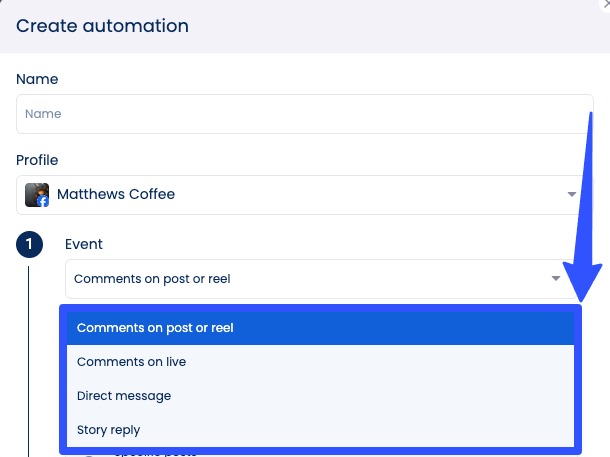
To set up your DM automations, start by choosing your trigger (the interaction that kicks off your automation).
Your trigger can be a comment on your client’s Instagram Live, post, or Reel, a Story reply, or a DM.
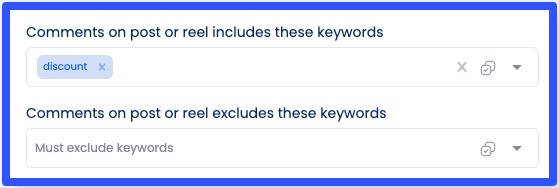
Then, set the keyword(s) that will trigger your automation, such as Information or link.
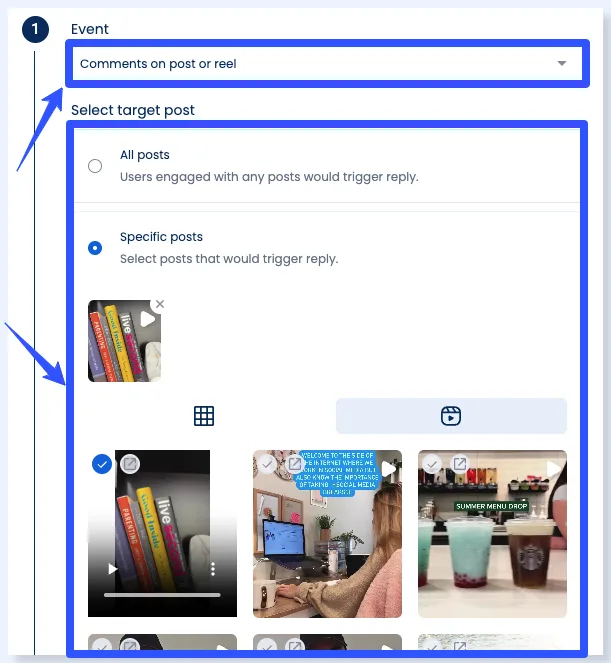
For comment triggers, select the specific Reel or post (or all posts) that your automation applies to.
Once you’re done, you can set up the actions for your trigger.
For example:
- Trigger: Direct Message
- Actions: Respond with a DM, which can be a text with an optional video, image, or card
Vista Social also offers ready-to-go templates for Auto-DM links for comments.
The feature lets you create engaging interactions on Facebook and Instagram, scaling your efforts.
To set up auto DMs from comments, go to Create on your Vista Social main menu, click DM Automations, and select the Create automation button.
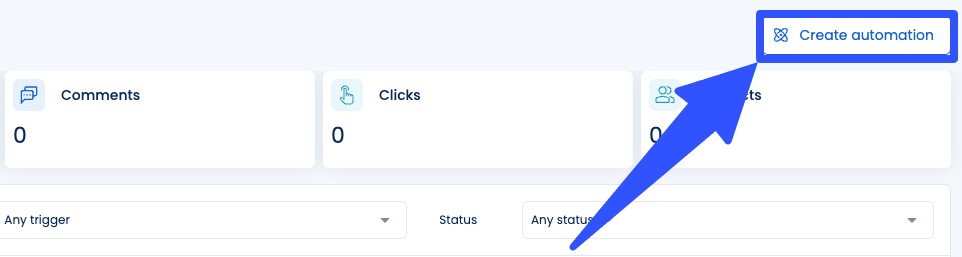
Select Ready-to-Go templates.
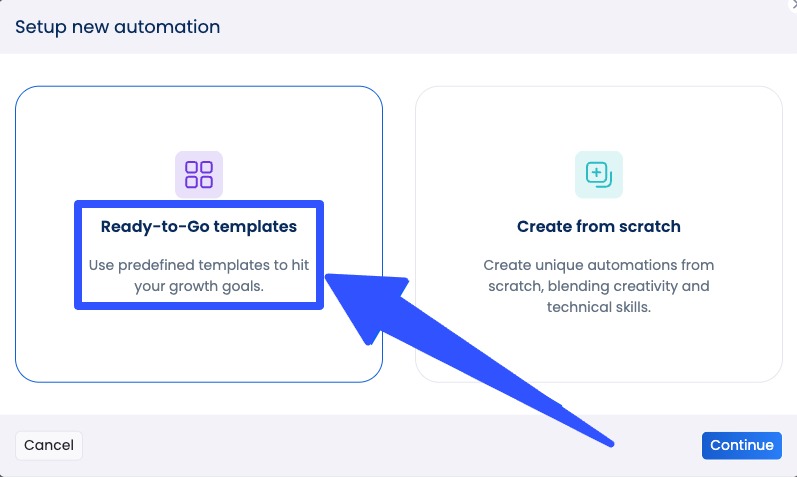
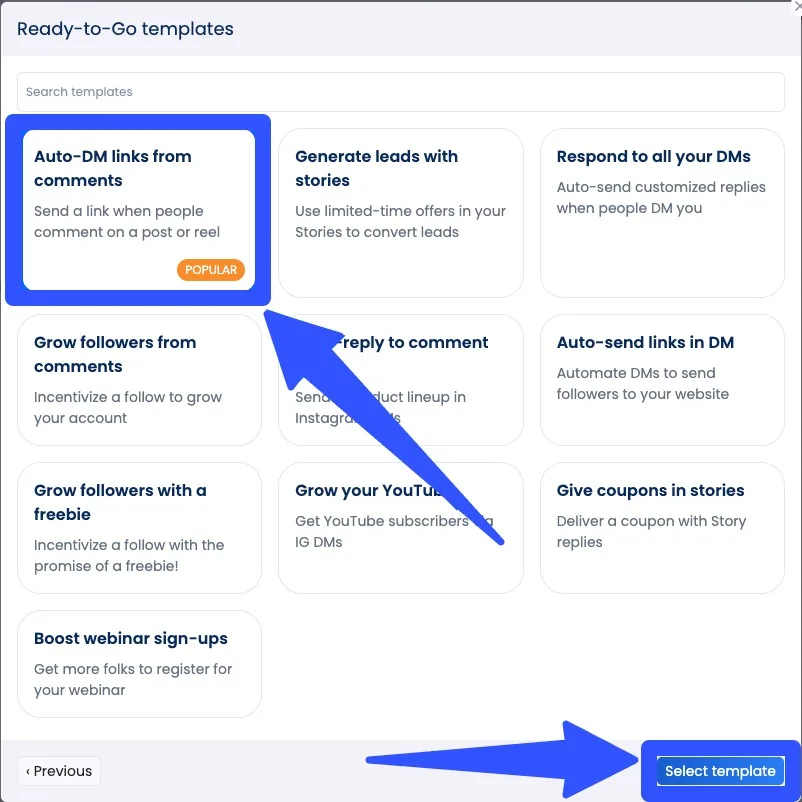
Click Auto-DM links from comments.
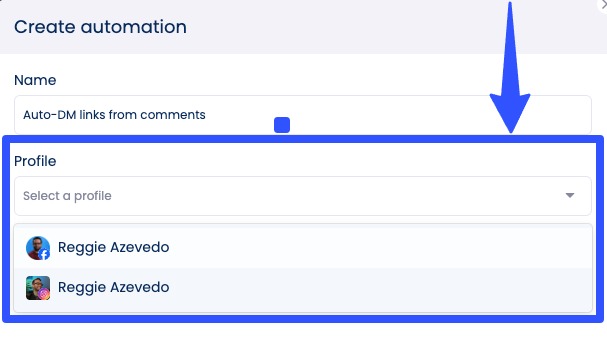
Next, select the Instagram or Facebook account where you want your automation to run.
Set your trigger (a comment on a specific or any post or Reel).
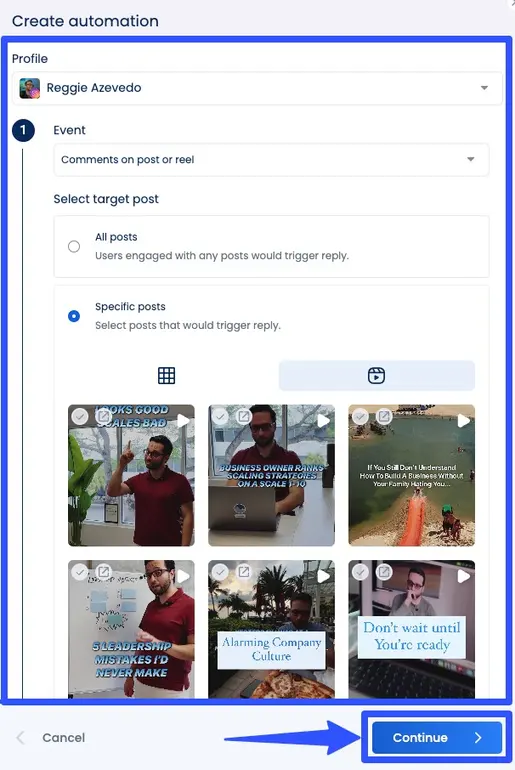
Then, set your trigger comment
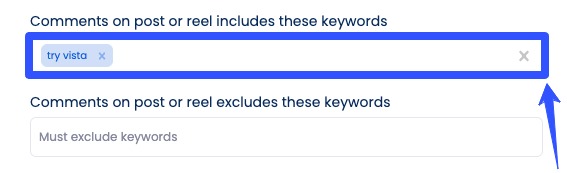
You can set it to activate on any comment or only when someone mentions a specific phrase or word.
You can also add a custom message to encourage commenters to follow your clients’ accounts.
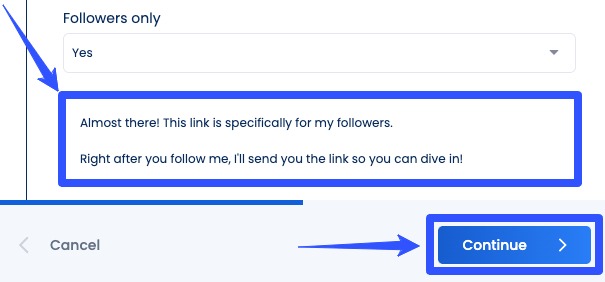
Click Continue, and you’re all set.
Want to send an automated opening DM?
Vista Social makes it easy for you to do this.
When someone taps the button inside your Opening DM, you can send the sender more messages within 24 hours.
You can enable this as your automation’s first action (or not), depending on your needs.
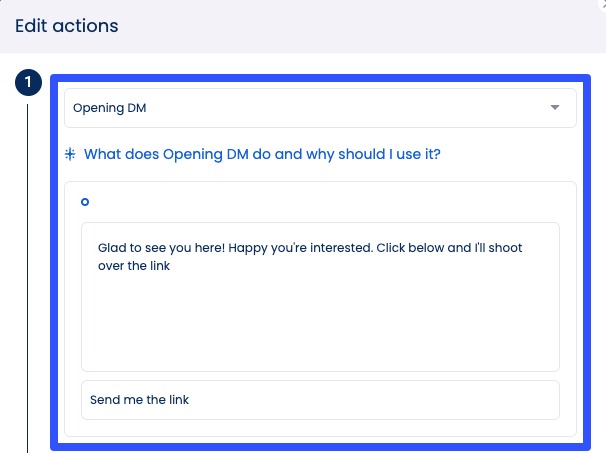
You can set up an automated follow-up message that the user receives when they click through.
You can up to three links, keep the message text-only, or customize the message accordingly.
Vista Social offers an AI Assistant in its Social Inbox that can generate responses to your clients’ comments, mentions, reviews, and DMs.
Click “Inbox” on the main side menu, then select a specific connected profile to view all social media engagement, including messages and interactions.
To generate a response, click the AI Assistant icon at the bottom of the screen.
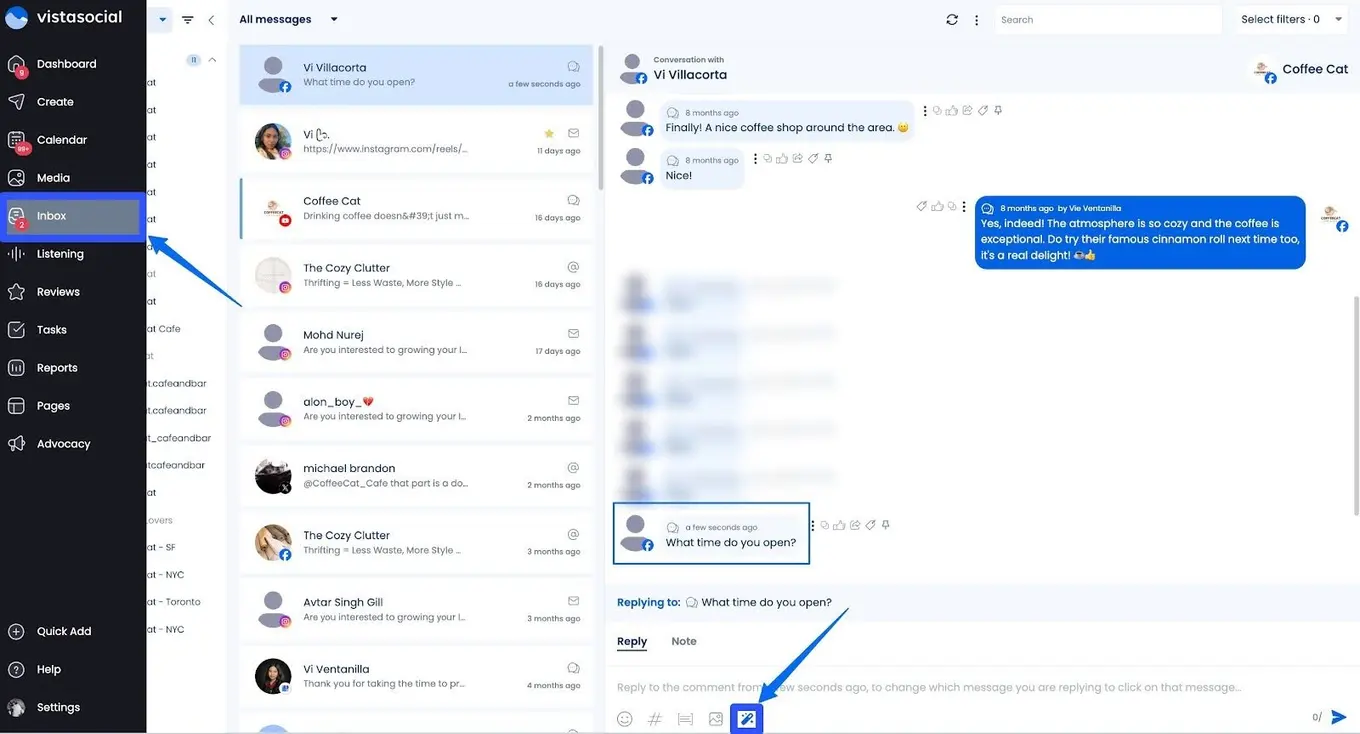
You can use the AI Assistant to refine your written response or generate a completely new one based on your prompt.
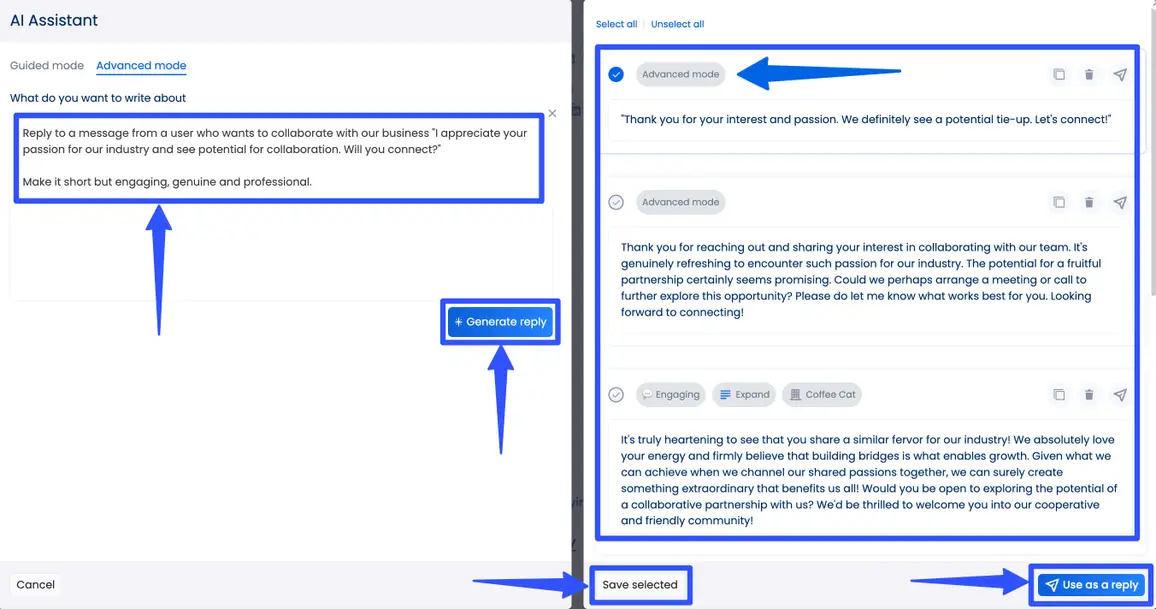
You can also save the responses for future use, streamlining your handling of your clients’ customer interactions across their social media platforms.
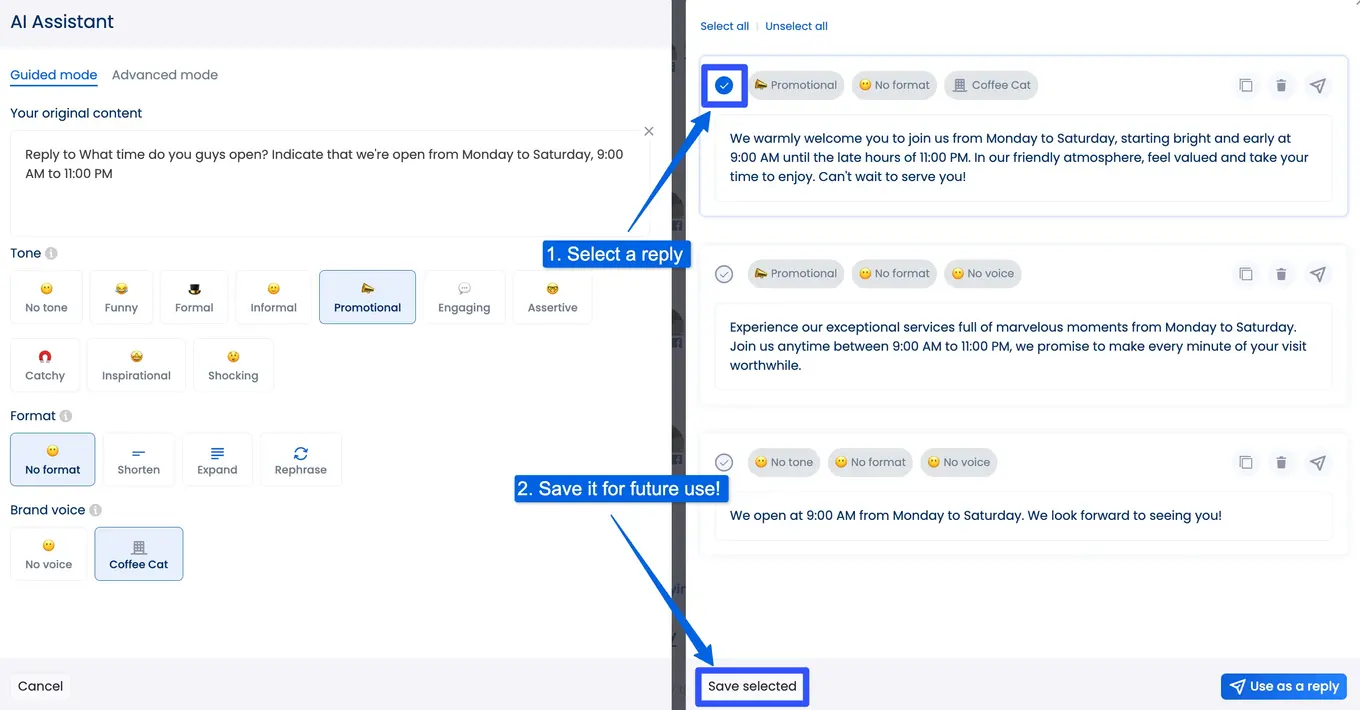
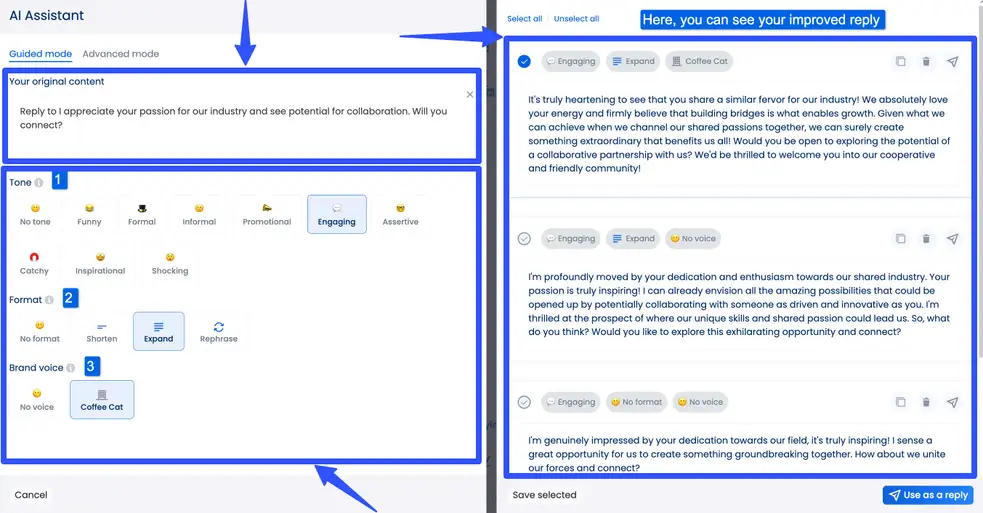
In the AI Assistant’s Guided mode, you can set the tone, format, and brand voice (This needs to be set up beforehand) to ensure the generated responses are on brand.
The platform’s built-in social media CRM, within the Social Inbox, lets you keep track of contacts and conversations.
Must read: Social Media Inbox Management Tools & Tips for 2025
It simplifies organizing key information about anyone who messages your clients’ brands across their linked social media channels.
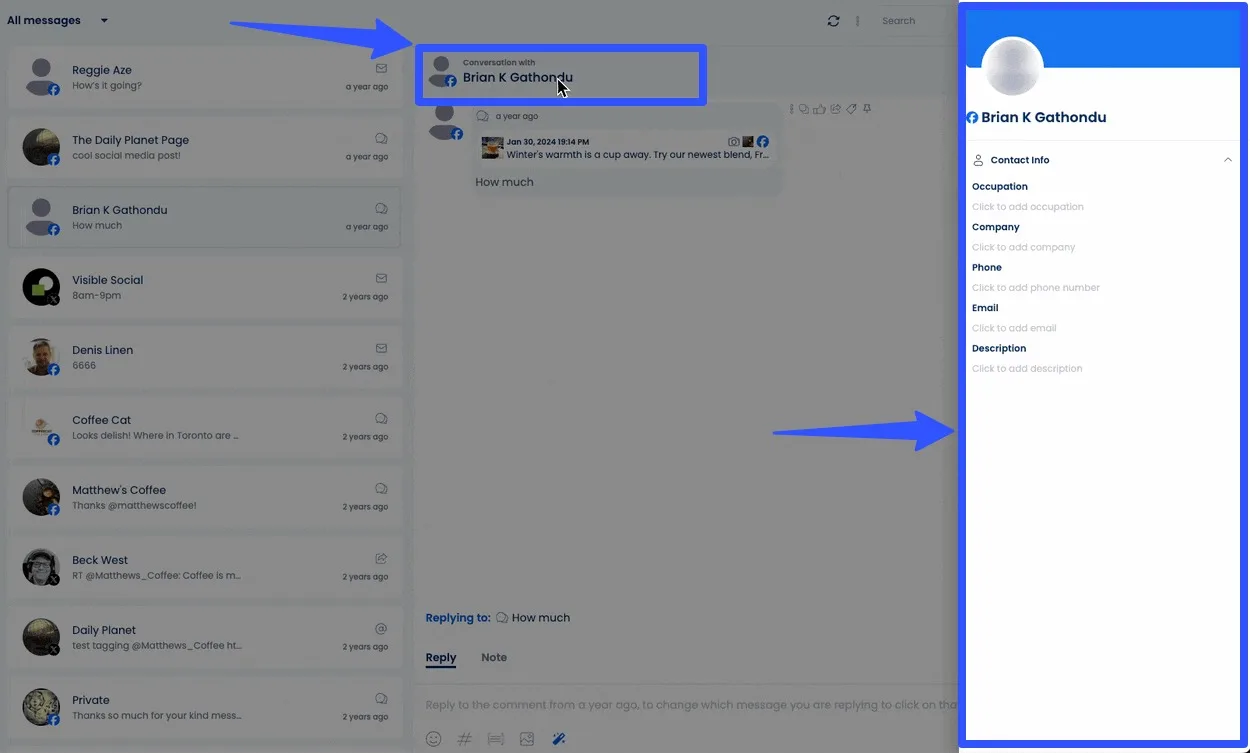
The feature allows you to save details about a sender, add context to replies, and sync with your clients’ Zendesk accounts for seamless data flows across their customer support requests.
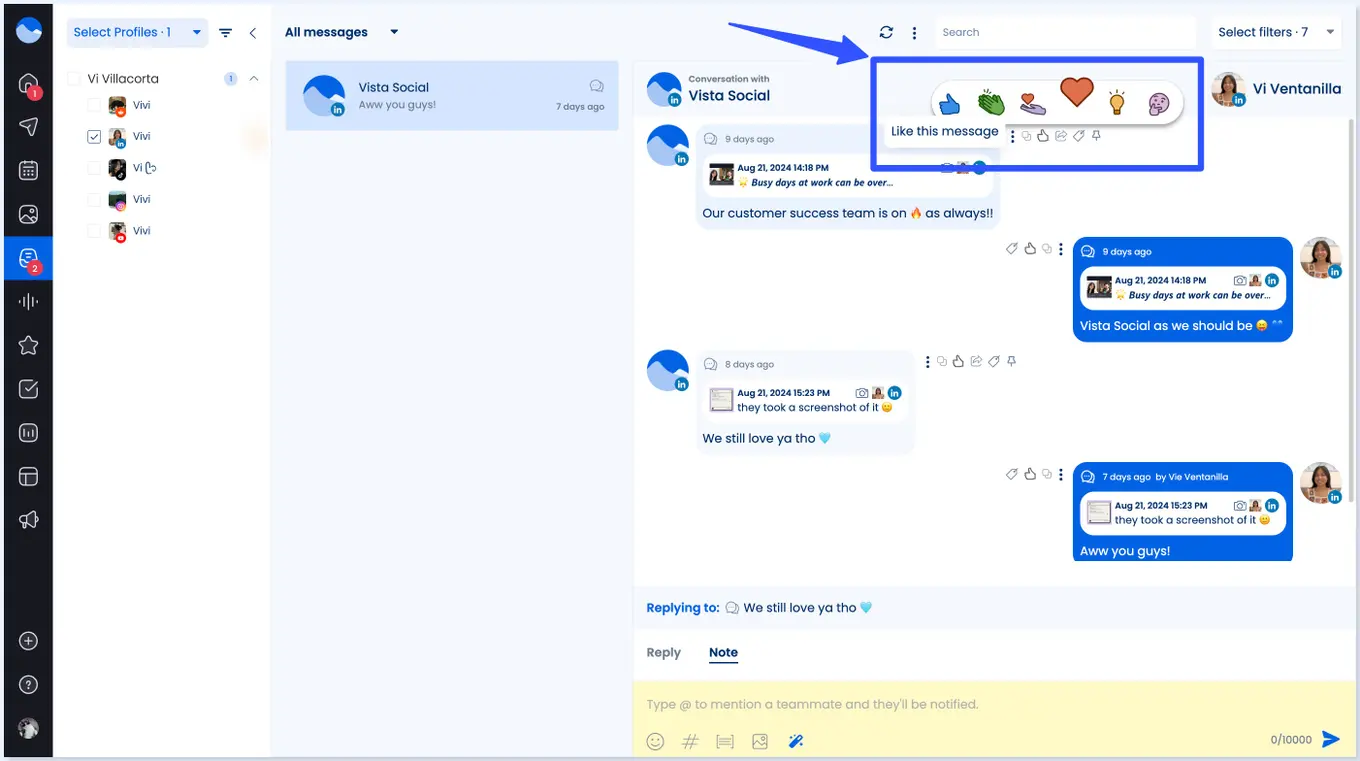
Vista Social’s unified Social Inbox offers more features, including the following:
- Message tagging for sorting and easy access
- Internal notes that you can use to mention team members and assign messages to ensure prompt handling
- Engagement options such as liking, disliking, deleting messages, and blocking users right from the Social Inbox
Must read: Social Media Monitoring vs. Social Media Listening
Don’t miss out on the other awesome features within Vista Social’s toolkit, such as:
- Social listening
- Post scheduling, including bulk publishing and post queueing
- Social media analytics and reporting, including custom report templates and report scheduling
- Review management
- Link in bio tool with customizable landing pages (Vista Page)
- Social media platform and other business tool integrations
- Content calendar
- Media library
- Optimal posting time recommendations
- Hashtag tools
- Trending audio library
- Content finder
- Automated post approval workflows (Single or multi-stage)
- Employee advocacy
Must read: What is the Future of Employee Advocacy?
DM automation strategies: Insights from experts
Get expert insights on DM automation from the social media marketing gurus and influencers below.
- Kim Garst: What Are Chatbots and Should I Use Them?
- Ann Handley: How to Write Like Robots Can’t
- Jillian Ney: Should You Use Auto Direct Messages on X?
FAQs on DM automation strategies
Is DM automation expensive to set up?
It doesn’t have to be.
Many social media management and automation platforms, such as Vista Social and apps like ManyChat, MobileMonkey, and others, offer affordable DM automation tools.
Must read: Top Real Estate Social Media Automation Tools
Start small by setting up a simple welcome message and scale up as you see results.
Can automation replace human interaction in DMs?
While automation efficiently handles routine inquiries and initial engagements, it shouldn’t replace human interaction entirely.
Sensitive topics, complex issues, or personalized assistance often require a human touch to build trust and ensure customer satisfaction.
Are there any risks associated with DM automation?
Potential risks include the following.
- Over-automation that can make interactions and conversations feel impersonal
- Automated messages may not accurately address specific user concerns
- Non-compliance with social media platform guidelines which can lead to account restrictions and penalties
How can you effectively personalize automated DMs?
Some strategies include using the recipient’s name, referencing their recent interactions, or tailoring messages based on their behavior.
For instance, if a user recently viewed a product, your automated message could mention that product and offer assistance.
You can also use dynamic tags and segment your audience to enhance personalization.
What types of messages work well with DM automation?
Common DM automation use-cases include the following:
- Welcome messages for new followers
- FAQ responses (business hours, shipping information, pricing)
- Lead qualifiers (messages that ask the user’s name or email to segment contacts)
- Content or promo delivery (links, promo codes, etc.)
- Conversation routing (tagging or transferring hot leads to the right team members)
How often should I review and update my DM automation?
It depends on your marketing strategy, campaign, messages, goals, and other factors, but ideally, it should be weekly or biweekly so you can:
- Track any triggers and paths that underperform
- Tweak your message’s wording based on user responses
- Include new keywords or flows for your clients’ upcoming campaigns
- Test fresh content flows while keeping your fallback paths solid
Ready to master your DM automation strategies?
Nailing your DM automation strategies doesn’t have to be complicated.
When you personalize your messages, guide users, stay true to your brand’s voice, and know when to add a human touch, you can turn automated DMs into powerful tools for building relationships and driving revenue.
One platform that makes DM automation simple, smart, and on-brand is Vista Social.
It has everything you need, from post scheduling and engagement management to robust reporting and analytics. Start your Vista Social account now.
Try Vista Social for free
A social media management platform that actually helps you grow with easy-to-use content planning, scheduling, engagement and analytics tools.
Get Started NowAbout the Author

Content Writer
Jimmy Rodela is a social media and content marketing consultant with over 9 years of experience, with work appearing on sites such as Business.com, Yahoo, SEMRush, and SearchEnginePeople. He specializes in social media, content marketing, SaaS, small business strategy, marketing automation, and content development.
Loading related tools...




Tools
PublishingAnalyticsEngagementIntegrations
FacebookInstagramLinkedInRedditSnapchatThreadsTikTokX (Twitter)YouTubeBlueskyVista Page (link-in-bio)All IntegrationsCopyright © 2026 Vista Social LLC. All Rights Reserved.